Container Apps Environment Networking (Consumption)
Azure Container Apps makes it easy to run containerized workloads without managing Kubernetes, but once those workloads need to integrate with enterprise networks, networking becomes the most important design decision.
At the heart of Azure Container Apps lies the Container Apps Environment (CAE), which defines isolation boundaries, networking behavior, and connectivity patterns. Understanding how networking works at the environment level is critical before choosing a hosting model.
ToC
All networking behavior in Azure Container Apps is defined at the Container Apps Environment (CAE) level. Choosing the right environment type directly affects how traffic enters your applications, how services communicate internally, and how outbound traffic is routed and controlled.
Azure Container Apps supports two environment types:
- Consumption-based environments
- Workload profile–based environments
Although both models share some networking fundamentals, they differ significantly in how much control you get.
ENVIRONMENT TYPES OVERVIEW
Consumption-based environments are designed to be fully serverless. They are ideal for APIs, event-driven workloads, and background processing where traffic is unpredictable and cost efficiency is important. Networking in this model is intentionally abstracted and managed by the platform.
Workload profile–based environments are designed for predictable, always-on workloads and enterprise scenarios that require deeper networking control. They provide more flexibility for routing and outbound traffic management.
NETWORKING FEATURE COMPARISON
| Networking Feature | Consumption Environment | Workload Profile Environment |
|---|---|---|
| VNet integration | Yes (required) | Yes (required) |
| Dedicated subnet | Yes (CAE-only subnet) | Yes (CAE-only subnet) |
| Internal ingress | Yes | Yes |
| External ingress | Yes | Yes |
| Service-to-service DNS | Yes | Yes |
| User-defined routes (UDRs) | Not supported | Fully supported |
| NAT Gateway | Not supported | Supported |
| Azure Firewall / NVA routing | Not supported | Supported |
| Custom outbound routing control | Very limited | Full control |
| Private Endpoints | Yes | Yes |
| On-prem connectivity (VPN/ER) | Yes | Yes |
CONSUMPTION ENVIRONMENT NETWORKING
A Consumption Container Apps Environment is always deployed into a dedicated subnet inside an Azure Virtual Network. The subnet is reserved exclusively for Container Apps and is fully managed by Azure. IP addressing and routing inside the subnet are not configurable by the customer.
INGRESS
Consumption environments use a fully managed ingress layer. You do not manage load balancers, ingress controllers, or TLS certificates.
Ingress supports:
- HTTP and HTTPS
- Automatic TLS termination
- Revision-based traffic splitting
- Public (external) or private (internal) exposure
Internal ingress is commonly used when APIs must not be internet-facing or when traffic is routed through an internal gateway.
INTERNAL COMMUNICATION
Container apps within the same environment communicate using built-in DNS names and encrypted east-west traffic. No service mesh, sidecars, or additional load balancers are required.
OUTBOUND TRAFFIC AND LIMITATIONS
Outbound networking is where Consumption environments differ most from Workload Profiles.
What is supported:
- Default Azure-managed outbound routing
- Access to public internet
- Private access to Azure services using Private Endpoints
- Connectivity to on-premises networks via VPN or ExpressRoute
What is not supported:
- NAT Gateway association
- User-defined routes (UDRs)
- Routing traffic through Azure Firewall or network virtual appliances (NVAs)
These limitations are intentional and exist to preserve the serverless nature of the Consumption model, including scale-to-zero and rapid elastic scaling.
WHEN TO USE CONSUMPTION
Consumption environments are a good fit when:
- You want scale-to-zero
- Networking requirements are simple
- Default Azure routing is acceptable
- Cost efficiency is a priority
If your workload requires static outbound IPs, firewall inspection, or advanced routing control, a Workload Profile environment is the correct choice.
IMPLEMENTATION
It's not possible to directly create a Consumption Container Apps Environment using a resource blade in the Azure portal. Instead, you create a standard Container Apps Environment and specify the Consumption hosting model during Container App creation.
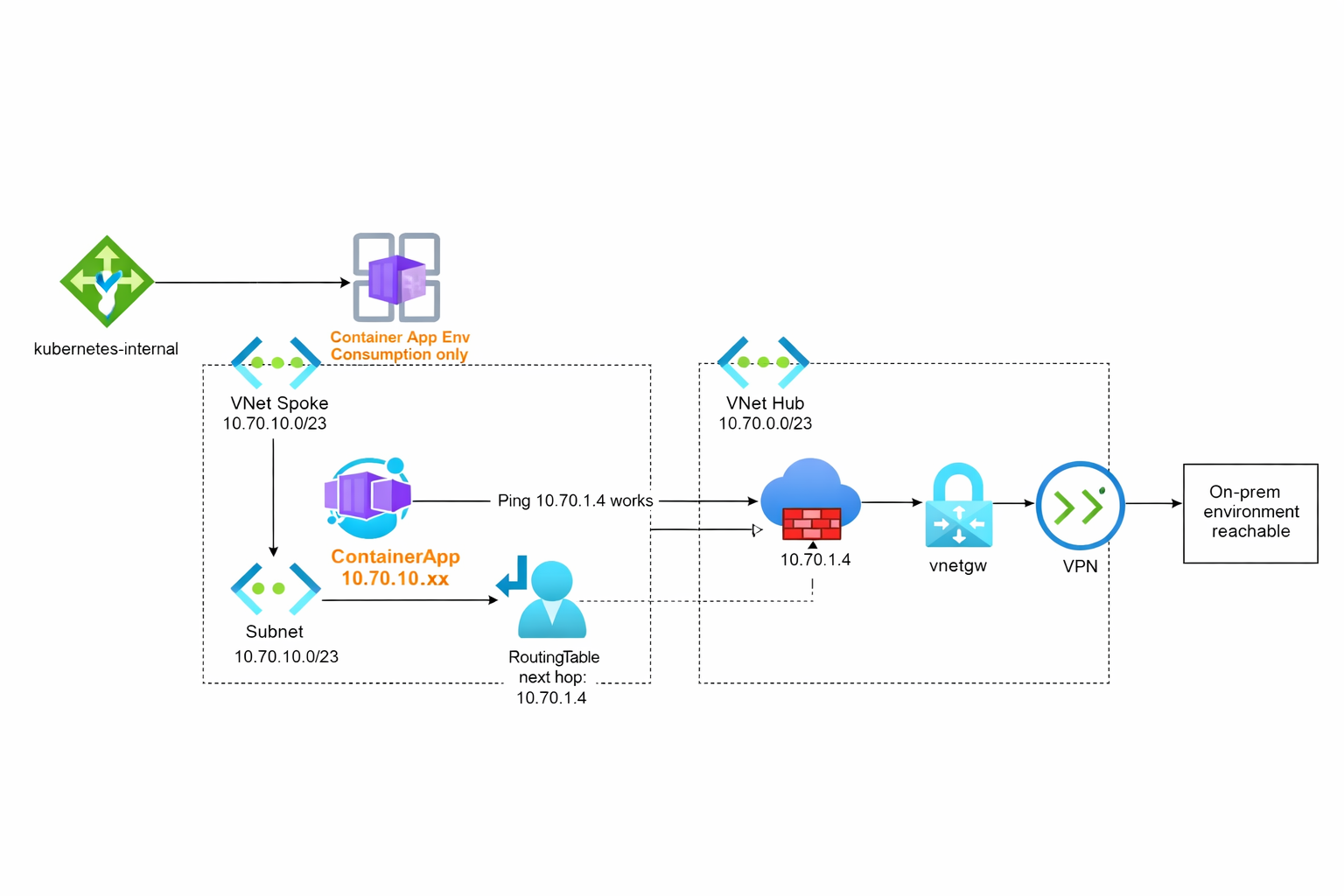
Tip: In the current Azure Portal experience, you can no longer create a “pure Consumption-only” Container Apps Environment. You can use the following Bicep template to create a legacy Consumption-only environment. This shows that the consumption environment is still supported, but not the preferred method for new deployments.Please note that when you create a CAE using this method, it is provisioned with the Consumption tier and a publicly accessible IP address. As a result, you do not have access to advanced networking features, such as assigning a private IPv4 address to your container. This means there is no granular visibility into traffic flow, and you cannot manipulate routing to send traffic through a central firewall by assigning a routing table.In contrast, a CAE created with a workload profile provides all of these capabilities.
	@description('Specifies the name of the container app environment.')
          	param containerAppEnvName string = 'env-\u0024{uniqueString(resourceGroup().id)}'

          	@description('Specifies the location for all resources.')
          	param location string = resourceGroup().location

          	resource containerAppEnv 'Microsoft.App/managedEnvironments@2022-06-01-preview' = {
          	  name: containerAppEnvName
          	  location: location
          	  sku: {
          	    name: 'Consumption'
          	  }
          	  properties: {
          	    appLogsConfiguration: {
          	      destination: 'log-analytics'
          	      logAnalyticsConfiguration: {
          	        customerId: ''
          	        sharedKey: ''
          	      }
          	    }
          	<div id="summary"></div>
          	  }
          	}
In the next article, we will explore the intergation of a full-fledged CAE with vNet and also route traffic to a central gateway (firewall) and eventually take look into the traffic flow logs.
In summary, Consumption-based Container Apps Environments provide a simplified, serverless networking model that abstracts much of the complexity. However, this comes with trade-offs in outbound traffic control and routing flexibility.