
Azure Route Server Deep Dive: Dynamic BGP Routing for NVA-Based Hub-and-Spoke Networks
Introduction
If you manage a hybrid Azure environment with third-party Network Virtual Appliances (NVAs), you already know the pain: static User Defined Routes (UDRs) that drift, manual updates every time a subnet changes, and zero scalability. In many real Azure hubs, that NVA is a FortiGate firewall doing both security inspection and dynamic routing. Without Route Server, teams end up writing scripts to push and clean up UDRs every time prefixes change. They drift. They break during maintenance. On-call engineers wake up at 2am because a branch office dropped off the network after a routine firewall or WAN change.
Azure Route Server eliminates that operational burden by introducing real BGP exchange between your NVAs and Azure's network fabric. When an NVA advertises a route to Route Server, Azure automatically programs that route into the VNet's effective route table — no UDRs required. When the NVA withdraws the route, Azure removes it. The routing stays in sync with your NVA in real time.
I have deployed Azure Route Server with FortiGate firewall NVAs in production hub-and-spoke environments. In this post, I'll walk you through the architecture, Azure-side deployment, FortiGate BGP configuration, validation workflow, and the specific gotchas that will cost you time in production if you're not prepared.
ToC
- Introduction
- What Is Azure Route Server?
- Planning and Prerequisites
- Step 1: Deploy Azure Route Server
- Step 2: Retrieve Route Server BGP Details
- Step 3: Configure NVA Peering on Route Server
- Step 4: Configure FortiGate BGP
- Step 5: Validate Route Exchange
- FortiGate Validation and Troubleshooting
- Branch-to-Branch Routing
- Spoke VNet Requirements
- Active-Active NVA Design with ECMP
- Key Gotchas and Limitations
- Route Server Capacity and RIUs
- Monitoring BGP Sessions
- Conclusion
What Is Azure Route Server?
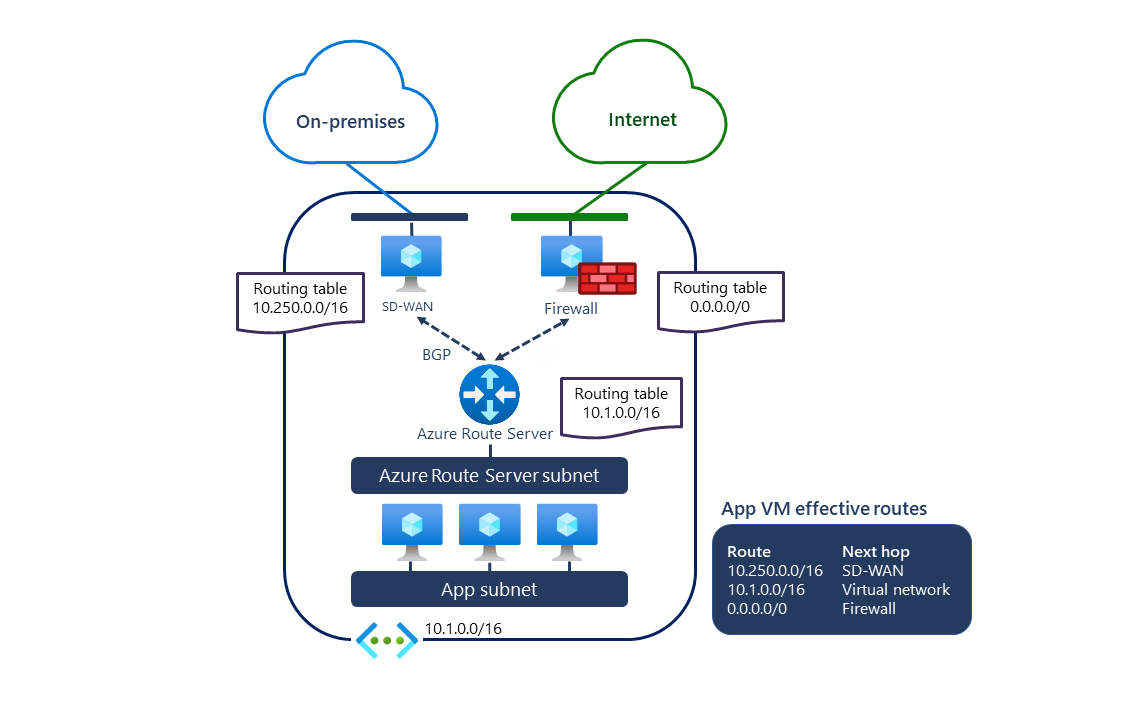
Azure Route Server is a fully managed BGP route reflector that you deploy inside a VNet. It doesn't inspect or forward traffic — it only exchanges routing information. Think of it as a control-plane service that bridges your NVA's BGP routing table and Azure's SDN routing fabric.
Here is how it fits into a standard hub-and-spoke architecture:
- Your hub VNet contains Route Server in RouteServerSubnet, a FortiGate firewall subnet/interface for data-plane forwarding, and optionally an ExpressRoute or VPN gateway.
- Route Server establishes eBGP sessions with the FortiGate's private interface IP (not a public IP).
- FortiGate advertises selected prefixes to Route Server — for example, branch or datacenter networks learned from your WAN edge.
- Route Server programs those routes into the hub VNet's effective route table, pointing the next-hop to the FortiGate private interface.
- Spoke VNets peered with the hub VNet (with gateway transit enabled) inherit those routes via VNet peering.
Route Server itself is highly available. It deploys as two instances across different fault domains, and Azure manages the redundancy transparently. Both instances participate in BGP — your NVA must peer with both IP addresses.
Planning and Prerequisites
Before deploying, resolve these three planning decisions:
1. RouteServerSubnet sizing. Azure Route Server requires a dedicated subnet named exactly `RouteServerSubnet` (case-sensitive). The current minimum is /26. Subnets smaller than /26 fail validation in current deployments. Plan this in your hub VNet address space before anything else — changing it later requires re-deploying Route Server.
2. ASN planning. Route Server uses ASN 65515 (reserved by Azure). Your NVA must use a different ASN. Avoid Azure-reserved and IANA-reserved values documented in Microsoft Learn:
- Azure-reserved public ASNs: 8074, 8075, 12076
- Azure-reserved private ASNs: 65515, 65517, 65518, 65519, 65520
- IANA-reserved ASNs: 23456, 64496-64511, 65535-65551
Good choices for NVA ASNs are private values that don't overlap the reserved lists (for example, 65001 and 65002). If you have multiple NVAs with different functions, give each a unique ASN.
3. Public IP requirement. Azure Route Server requires a Public IP resource during deployment because the service is managed by Azure through platform management endpoints. This does not mean customer traffic flows through that Public IP. Route Server remains a control-plane service: it exchanges BGP routes with NVAs, VPN gateways, and ExpressRoute gateways, while workload traffic follows the programmed routes directly between the relevant network components.
Step 1: Deploy Azure Route Server
Start with a hub VNet that has the `RouteServerSubnet` subnet. If you're building from scratch:
# Create resource group and hub VNet
          az group create \
            --name rg-hub-prod \
            --location australiaeast

          az network vnet create \
            --resource-group rg-hub-prod \
            --name vnet-hub-prod \
            --address-prefix 10.0.0.0/16

          # Add the RouteServerSubnet — minimum supported size is /26
          az network vnet subnet create \
            --resource-group rg-hub-prod \
            --vnet-name vnet-hub-prod \
            --name RouteServerSubnet \
            --address-prefix 10.0.0.0/26

          # Add the NVA subnet
          az network vnet subnet create \
            --resource-group rg-hub-prod \
            --vnet-name vnet-hub-prod \
            --name snet-nva \
            --address-prefix 10.0.1.0/28
Now deploy Route Server:
# Get the RouteServerSubnet resource ID
          SUBNET_ID=$(az network vnet subnet show \
            --resource-group rg-hub-prod \
            --vnet-name vnet-hub-prod \
            --name RouteServerSubnet \
            --query id -o tsv)

          # Create the required public IP resource for Route Server
          az network public-ip create \
            --resource-group rg-hub-prod \
            --name pip-routeserver \
            --sku Standard \
            --allocation-method Static \
            --location australiaeast

          # Deploy the Route Server
          az network routeserver create \
            --resource-group rg-hub-prod \
            --name rs-hub-prod \
            --hosted-subnet $SUBNET_ID \
            --public-ip-address pip-routeserver \
            --location australiaeast
Deployment can take up to 30 minutes. If the VNet already contains an ExpressRoute or VPN gateway, treat this as a change window and plan a longer maintenance window (commonly 60 minutes) because gateway behavior can be affected during Route Server create/delete operations.
Step 2: Retrieve Route Server BGP Details
Once deployed, get the Route Server's ASN and the two peer IP addresses. You'll need these to configure your NVA:
az network routeserver show \
            --resource-group rg-hub-prod \
            --name rs-hub-prod \
            --query "{ASN:virtualRouterAsn, PeerIPs:virtualRouterIps}" \
            -o json
Expected output:
{
            "ASN": 65515,
            "PeerIPs": [
              "10.0.0.4",
              "10.0.0.5"
            ]
          }
Note both IP addresses. Your NVA must establish BGP sessions with both instances. This is not optional — if you only peer with one, you have an asymmetric, single-point-of-failure BGP session.
Step 3: Configure NVA Peering on Route Server
Register FortiGate as a BGP peer. Use the FortiGate internal/private interface IP that participates in routing (for example, the LAN or transit interface in the hub subnet), not the FortiGate public management IP.
# Example: FortiGate private routing interface IP
          FGT_PEER_IP="10.0.1.4"

          # Create Route Server peering to FortiGate (FortiGate ASN 65010)
          az network routeserver peering create \
            --resource-group rg-hub-prod \
            --routeserver rs-hub-prod \
            --name peer-fgt01 \
            --peer-asn 65010 \
            --peer-ip $FGT_PEER_IP
If you have a second FortiGate in active-active design, create a second peering for that node's private routing interface. Multiple peers can connect to the same Route Server.
Step 4: Configure FortiGate BGP
In this design, the NVA is a FortiGate firewall. Configure FortiGate to peer with both Route Server instance IPs using ASN 65010 on FortiGate and remote ASN 65515 for Azure Route Server.
config router bgp
              set as 65010
              set router-id 10.0.1.4
              config neighbor
                  edit "10.0.0.4"
                      set remote-as 65515
                      set ebgp-enforce-multihop enable
                  next
                  edit "10.0.0.5"
                      set remote-as 65515
                      set ebgp-enforce-multihop enable
                  next
              end
              config network
                  edit 1
                      set prefix 172.16.0.0 255.255.0.0
                  next
                  edit 2
                      set prefix 192.168.100.0 255.255.255.0
                  next
              end
          end
> FortiOS syntax can vary slightly by version. Validate command form against your deployed FortiOS build.
FortiGate route advertisement policy (important)
Do not blindly advertise every connected route from FortiGate. Advertise only prefixes that should be reachable through the firewall inspection path. In production, control advertisements and accepted routes with FortiGate prefix-lists and route-maps.
config router prefix-list
              edit "PL-OUT-AZURE-RS"
                  config rule
                      edit 1
                          set prefix 172.16.0.0 255.255.0.0
                          set ge 16
                          set le 24
                      next
                  end
              next
          end

          config router route-map
              edit "RM-OUT-AZURE-RS"
                  config rule
                      edit 1
                          set match-ip-address "PL-OUT-AZURE-RS"
                      next
                  end
              next
          end
Attach route-map/prefix policy to FortiGate BGP neighbors according to your FortiOS version and design standards. Route filtering policy should be enforced on FortiGate because Route Server is not a full route-policy engine.
Step 5: Validate Route Exchange
Once both sides are configured, verify both Azure-side and FortiGate-side state.
# Check peering state (should be "Connected")
          az network routeserver peering show \
            --resource-group rg-hub-prod \
            --routeserver rs-hub-prod \
            --name peer-fgt01 \
            --query peeringState \
            -o tsv

          # See what prefixes Route Server has LEARNED from FortiGate
          az network routeserver peering list-learned-routes \
            --resource-group rg-hub-prod \
            --routeserver rs-hub-prod \
            --name peer-fgt01 \
            -o table

          # See what prefixes Route Server is ADVERTISING to FortiGate
          az network routeserver peering list-advertised-routes \
            --resource-group rg-hub-prod \
            --routeserver rs-hub-prod \
            --name peer-fgt01 \
            -o table
FortiGate-side verification:
get router info bgp summary
          get router info bgp neighbors
          get router info bgp network
          get router info routing-table all
Exact command output varies by FortiOS version, but you should confirm that:
- both Route Server peers are established,
- expected prefixes are advertised by FortiGate,
- expected Azure/spoke/hybrid routes are learned,
- forwarding uses the intended next hops.
To confirm the routes are actually programmed into the VNet fabric, inspect the effective routes on a NIC in the hub VNet:
# Get NIC name of a test VM in the hub
          NIC_ID=$(az vm show \
            --resource-group rg-hub-prod \
            --name vm-test \
            --query 'networkProfile.networkInterfaces[0].id' -o tsv)

          NIC_NAME=$(basename $NIC_ID)

          az network nic show-effective-route-table \
            --resource-group rg-hub-prod \
            --name $NIC_NAME \
            -o table
Look for routes with source `VirtualNetworkGateway` pointing to your FortiGate private interface IP — these are the BGP-learned routes that Route Server programmed.
FortiGate Validation and Troubleshooting
If peering is up but traffic still fails, use this checklist:
- Confirm Azure Route Server peer IPs with `az network routeserver show` and verify FortiGate peers with both instance IPs.
- Confirm FortiGate neighbor remote ASN is `65515` and FortiGate local ASN matches Azure peering configuration (for this design, `65010`).
- Confirm Azure NIC IP forwarding is enabled on FortiGate data-plane NICs.
- Confirm FortiGate firewall policies allow intended traffic flows; BGP routes alone don't permit traffic.
- Confirm UDRs, VNet peering, and gateway-transit settings are aligned with the target path.
- Confirm FortiGate advertises expected prefixes and receives expected spoke/hybrid prefixes.
- Confirm NSGs and route tables don't block the forwarding path.
- Confirm asymmetric routing is avoided across hub-and-spoke flows (especially with dual firewalls and ECMP).
Branch-to-Branch Routing
Branch-to-Branch (B2B) is one of Route Server's most impactful capabilities in real enterprise deployments. When enabled, Route Server exchanges routes between:
- Your NVAs and your ExpressRoute gateway
- Your NVAs and your VPN gateway
- Your ExpressRoute gateway and your VPN gateway
The practical scenario: You have an ExpressRoute circuit connecting your primary datacentre (DC1) to Azure. You also have an SD-WAN NVA in the hub managing MPLS-connected branch offices. Without B2B, your DC1 can reach Azure, and your branches can reach Azure (via the NVA), but DC1 and the branches cannot reach each other through Azure's hub — you'd need a direct MPLS or WAN link.
With B2B enabled, Route Server becomes the route exchange point between your ExpressRoute gateway and your SD-WAN NVA. Branch routes advertised by the NVA are propagated to your DC1 via ExpressRoute, and DC1 routes learned via ExpressRoute are propagated to your branches via the NVA. Azure becomes your transit hub.
# Enable Branch-to-Branch on Route Server
          az network routeserver update \
            --resource-group rg-hub-prod \
            --name rs-hub-prod \
            --allow-b2b-traffic true
Important warning: Changing B2B status on an active Route Server with live BGP peerings will briefly disrupt BGP sessions. Plan this change during a maintenance window. Enable it at initial deployment time whenever possible.
Spoke VNet Requirements
For NVA-advertised routes to reach your spoke VNets, two conditions must be met in the VNet peering configuration:
Hub side (hub → spoke peering):
az network vnet peering update \
            --resource-group rg-hub-prod \
            --vnet-name vnet-hub-prod \
            --name peer-hub-to-spoke01 \
            --set allowGatewayTransit=true
Spoke side (spoke → hub peering):
az network vnet peering update \
            --resource-group rg-spoke01 \
            --vnet-name vnet-spoke01 \
            --name peer-spoke01-to-hub \
            --set useRemoteGateways=true
Without `allowGatewayTransit=true` on the hub side, Route Server cannot propagate routes to spoke VNets. Without `useRemoteGateways=true` on the spoke side, the spoke VNet won't accept remote gateway routes. Both must be set.
Note: `useRemoteGateways` on the spoke side requires either an ExpressRoute/VPN Gateway OR a Route Server to be present in the hub VNet. If neither exists, the setting will fail.
Active-Active NVA Design with ECMP
For production deployments, you should deploy two NVA instances in different Availability Zones, each peered with Route Server. When both NVAs advertise the same prefixes, Azure programs both next-hops into the routing table. Azure's SDN uses ECMP (Equal-Cost Multi-Path) to distribute traffic across both NVAs.
# Peer the second NVA
          az network routeserver peering create \
            --resource-group rg-hub-prod \
            --routeserver rs-hub-prod \
            --name peer-fgt02 \
            --peer-asn 65010 \
            --peer-ip 10.0.1.5
ECMP behaviour: Both NVAs must advertise identical prefixes with equal AS-PATH length. If one NVA's AS-PATH is longer (indicating a less-preferred path), Azure will prefer the shorter path and not ECMP. Ensure your NVA configurations are symmetrical.
Failover: When an NVA fails and stops advertising routes (due to BGP session teardown, NVA reboot, or health probe failure), Route Server removes its routes from the VNet fabric and traffic shifts to the surviving NVA. Treat failover timing as design-dependent and validate it in your own lab.
Microsoft documents Route Server timers as keepalive 60s and hold timer 180s. You can tune timers on your NVA side, but don't publish a fixed failover SLA unless you have measured it with your exact NVA image, route scale, and policy set. Treat any aggressive timer tuning as platform-specific and validate convergence behavior in a lab before production rollout.
Key Gotchas and Limitations
These are the issues I see catch engineers off guard in production:
1. Route limits and scale boundaries. Current Route Server limits are 4,000 routes per BGP peer, up to 16 BGP peers, and 10,000 total prefixes per deployment. If a peer exceeds limits during updates, the BGP session can be dropped. A separate 1,000-route limit applies in the ExpressRoute path when branch-to-branch is enabled (total routes advertised from VNet + Route Server toward ExpressRoute).
2. Azure Firewall is not a Route Server peer. Azure Firewall doesn't support BGP. Route Server is designed for BGP-capable NVAs. If your hub uses Azure Firewall for inspection, you continue to use UDRs for that — Route Server and Azure Firewall serve different purposes and can coexist in the same hub, but Azure Firewall doesn't participate in BGP.
3. Virtual WAN boundary condition. A spoke VNet connected to a Virtual WAN hub can't also host Azure Route Server. Keep Route Server in standard hub-and-spoke VNets, and use Virtual WAN's native routing model inside VWAN topologies.
4. Route filtering model and NO_ADVERTISE nuance. Route Server doesn't provide the same policy framework as a full-featured router, so prefix policy should still be enforced on the NVA (prefix-lists/route-maps). However, Route Server supports the NO_ADVERTISE BGP community; routes tagged with NO_ADVERTISE by the NVA aren't propagated by Route Server to other peers (including ExpressRoute gateway peers).
5. Public IP resource is required at creation. Route Server deployment requires a Public IP resource as part of the managed service architecture. Treat it as a platform dependency for provisioning and operations rather than a customer data-plane endpoint. See the Route Server FAQ.
6. RouteServerSubnet cannot host other resources. No VMs, private endpoints, or any other resources can be deployed in the RouteServerSubnet. It must be exclusively for Route Server. Attempting to deploy other resources will fail.
7. BGP session is eBGP, not iBGP. Despite the NVA and Route Server being in the same VNet, Route Server uses eBGP. This means your NVA router configuration must use eBGP (different ASNs), and `ebgp-multihop` is required because Route Server IPs are not directly adjacent at L3.
Route Server Capacity and RIUs
In larger environments, don't treat Route Server as a fixed-size black box. Capacity is governed by Routing Infrastructure Units (RIUs).
- Default deployment is 2 RIUs, which supports about 4,000 VMs across the Route Server VNet and peered VNets.
- You can increase RIUs to reserve more capacity in 1,000-VM increments.
- Scale-out isn't instant; Microsoft notes it can take up to about 25 minutes.
- Even with higher RIUs, Route Server still has a 10,000 total-route acceptance limit.
Practical guidance: if you're planning rapid spoke growth or large route tables, set a higher minimum RIU ahead of time rather than waiting for reactive autoscaling.
Monitoring BGP Sessions
Don't wait for a production incident to find out your BGP sessions are down. Set up proactive monitoring.
Check session state via Azure CLI:
az network routeserver peering show \
            --resource-group rg-hub-prod \
            --routeserver rs-hub-prod \
            --name peer-fgt01 \
            --query "{State:peeringState, ASN:peerAsn, IP:peerIp}" \
            -o json
Azure Monitor metric alerts: Build alerts on Route Server metrics instead of relying on Activity Log state-change events. The most useful baseline is:
- `BGP Peer Status` (binary): `1` means established, `0` means down. Alert when value is `0`.
- Split alerts by `BGP Peer IP` so you can identify exactly which NVA peer failed.
- Track `Count of Routes Learned from Peer` and `Count of Routes Advertised to Peer` and alert on abnormal drops.
A BGP session can remain established while route exchange breaks. In production, route-count alerts often catch failures faster than a simple session-up/session-down check. Use Maximum aggregation for these metrics and a practical granularity (typically 5 minutes or higher) to reduce noise.
FortiGate-side operations should also be monitored continuously:
- BGP neighbor state transitions and session flaps on FortiGate
- route-count changes (learned and advertised)
- firewall policy hit counters for critical north-south/east-west flows
- interface health plus CPU/memory trends on FortiGate appliances
If you run FortiManager or FortiAnalyzer, use them for centralized dashboards, historical logs, and correlation — useful, but not mandatory.
For a PowerShell-based approach to checking all peerings in bulk:
$rg = "rg-hub-prod"
          $rsName = "rs-hub-prod"

          Get-AzRouteServerPeer -ResourceGroupName $rg -RouteServerName $rsName | ForEach-Object {
              $learned = Get-AzRouteServerPeerLearnedRoute -ResourceGroupName $rg -RouteServerName $rsName -PeerName $_.Name
              [PSCustomObject]@{
                  PeerName   = $_.Name
                  PeerIP     = $_.PeerIp
                  PeerASN    = $_.PeerAsn
                  State      = $_.PeeringState
                  Routes     = $learned.Count
              }
          } | Format-Table -AutoSize
Conclusion
Azure Route Server is one of those services that looks deceptively simple — deploy a BGP reflector, peer it with your NVA, done. The reality, as with most enterprise networking topics, is that the details matter enormously. Route limits, ASN planning, multihop requirements, spoke VNet peering settings, B2B timing, and ECMP behaviour all have production implications.
The core value proposition is straightforward: in a FortiGate-based Azure hub, Route Server eliminates the operational burden of static UDR management. Routes stay in sync with FortiGate's BGP table automatically, in real time.
For organisations transitioning from on-premises BGP-based routing to Azure, Route Server provides the familiar control-plane semantics you're used to, just abstracted into a managed service. Your network team can reason about the routing using standard BGP tools and concepts, rather than learning a new Azure-specific routing model.
References: