Secure Azure AI Foundry and PaaS resources with Private Endpoint
Introduction
In the previous posts of this series, we built the network foundation for running containerized AI workloads in a hub-and-spoke Azure architecture. First, we deployed an Azure Container Apps Environment (CAE) integrated with a spoke VNet and forced all outbound traffic through a centralized NVA in the hub using UDRs, then validated the flows in firewall logs. After that, we focused on the inbound path: publishing a private Container Apps–hosted AI chatbot through Azure Application Gateway (WAF) and using Log Analytics to analyze access and WAF events. That post also introduced an important theme we’ll keep building on: when services are private, DNS becomes part of the connectivity design, not an afterthought.
ToC
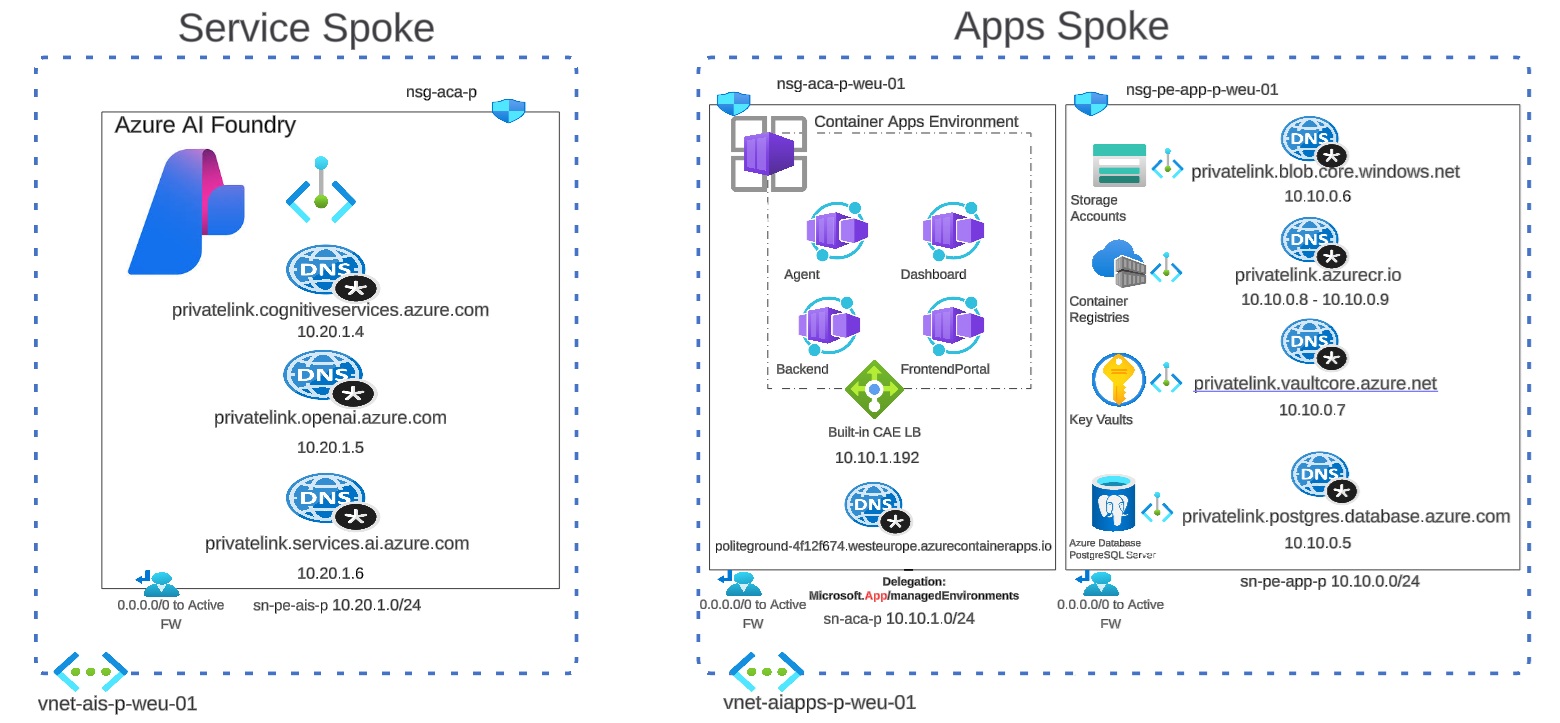
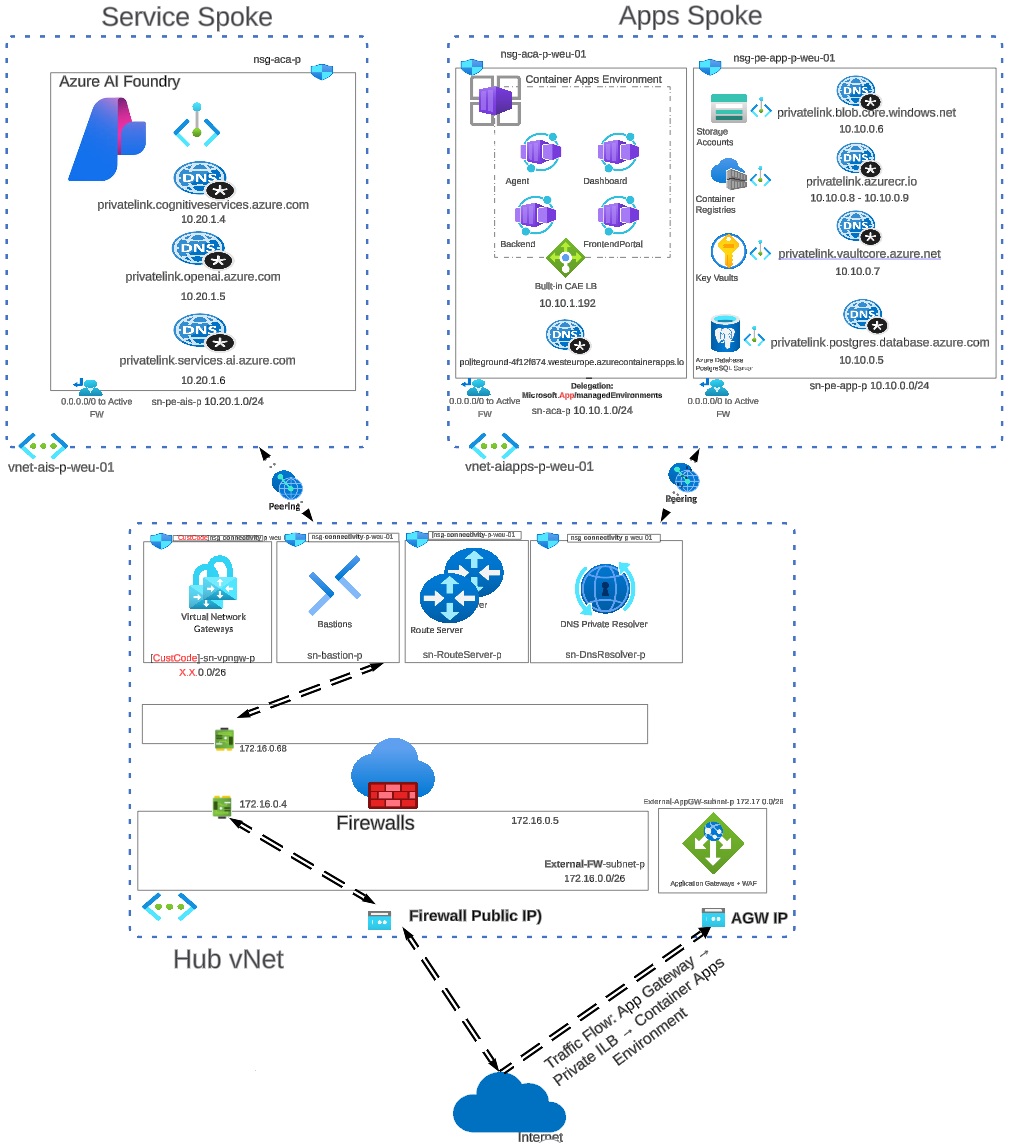
In this new post, we shift the spotlight to the AI services side of the architecture, specifically the ai-services resource group (Azure AI Foundry) and how we connect to it securely from other networks. The following diagram shows a hub-and-spoke architecture where the Service Spoke hosts Azure AI Foundry and exposes it privately using Private Endpoints, while the required Private DNS zones ensure AI service FQDNs resolve to private IPs.
Architecture Overview
The Apps Spoke runs the Container Apps Environment and connects to its dependencies (Key Vault, ACR, Storage, PostgreSQL) the same way, via Private Endpoints and Private DNS. The Hub VNet centralizes shared services (Firewall, routing, DNS Private Resolver) to provide consistent name resolution and secure connectivity between spokes over VNet peering.
The goal is simple: ensure workloads in the apps spoke (and shared services in the hub) reach AI endpoints only via private IPs using Private Endpoint, and resolve the correct service FQDNs consistently using Private DNS zones (split-horizon DNS) across hub/spoke VNets. We’ll walk through the Private Link + Private DNS building blocks, explain where teams usually get stuck (zone placement, VNet links, and resolver behavior), and finish with repeatable validation steps so you can prove your traffic stays on the Azure backbone end-to-end.
Create a Private Endpoint (AI Foundry)
The first step is creating a private endpoint for Microsoft AI Foundry. Creating the private endpoint is almost a straightforward task.
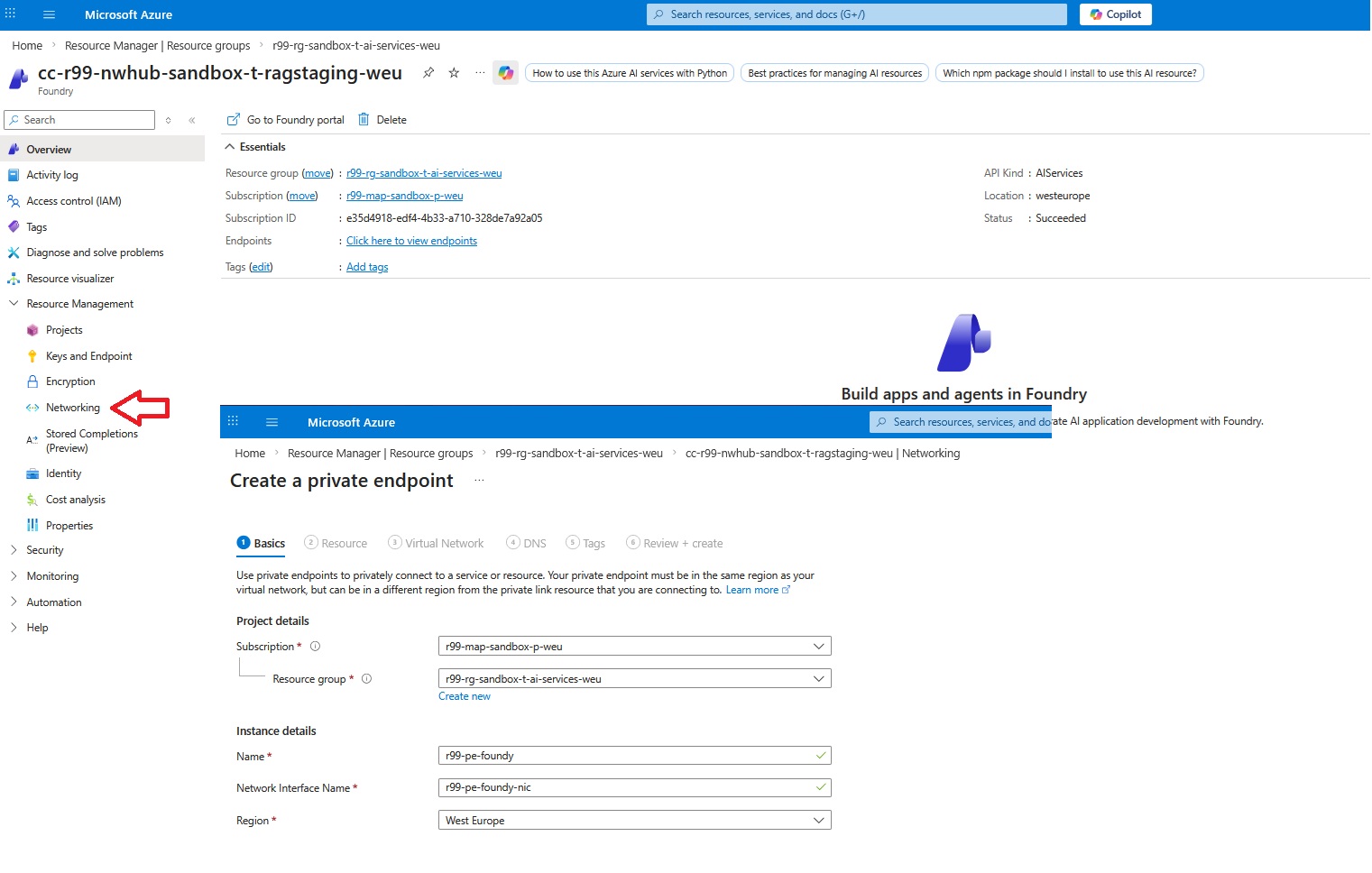
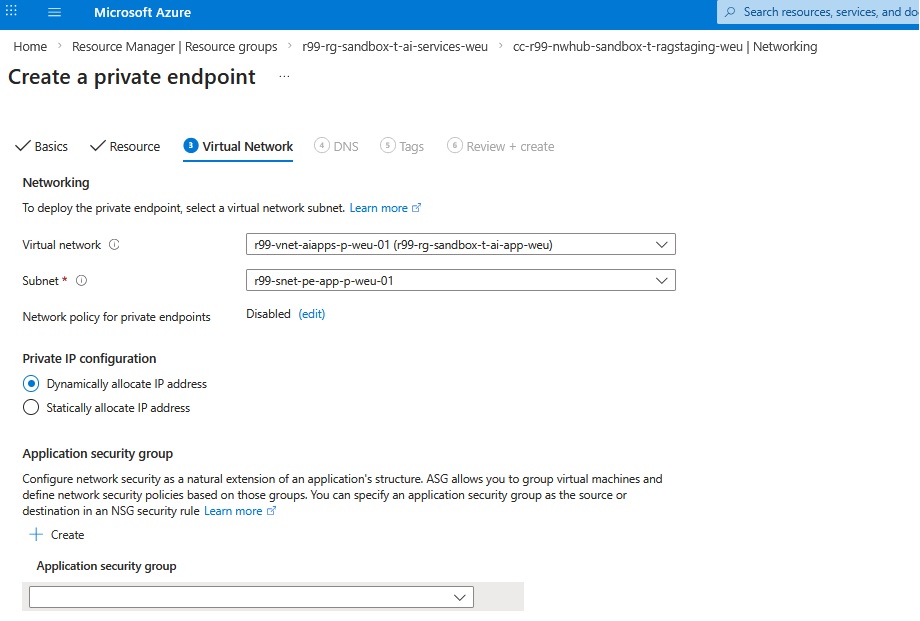
The next step is to assign the right VNet and subnet to the private endpoint. There’s no need for special configuration for the subnet and the default subnet works.
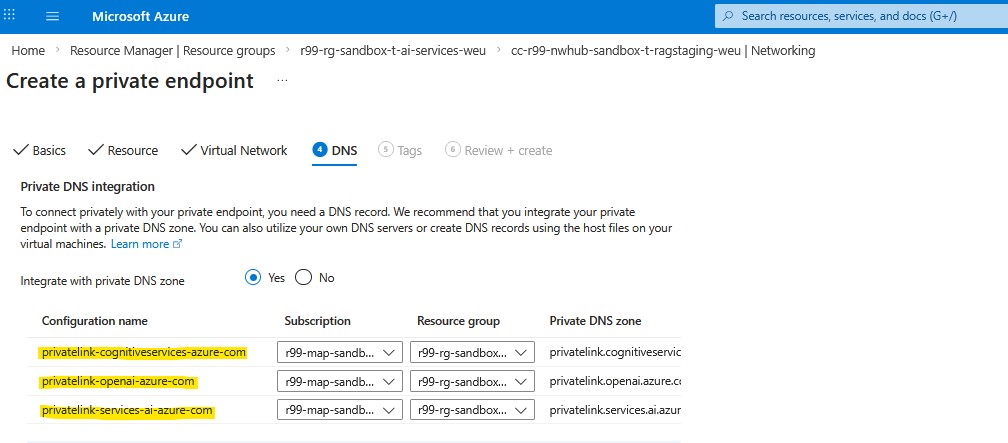
AI Foundry: Three Private DNS Zones
There’s a subtle nuance in the DNS zone configuration. For most Azure PaaS services, a Private Endpoint typically maps to a single Private DNS zone. With Azure AI Foundry, however, you need three Private DNS zones. This is because “Azure AI Foundry” is not a single endpoint. Under the hood, the experience spans multiple service planes (and therefore multiple DNS namespaces).
Now it’s time to hit the Review + create section and create the resource.
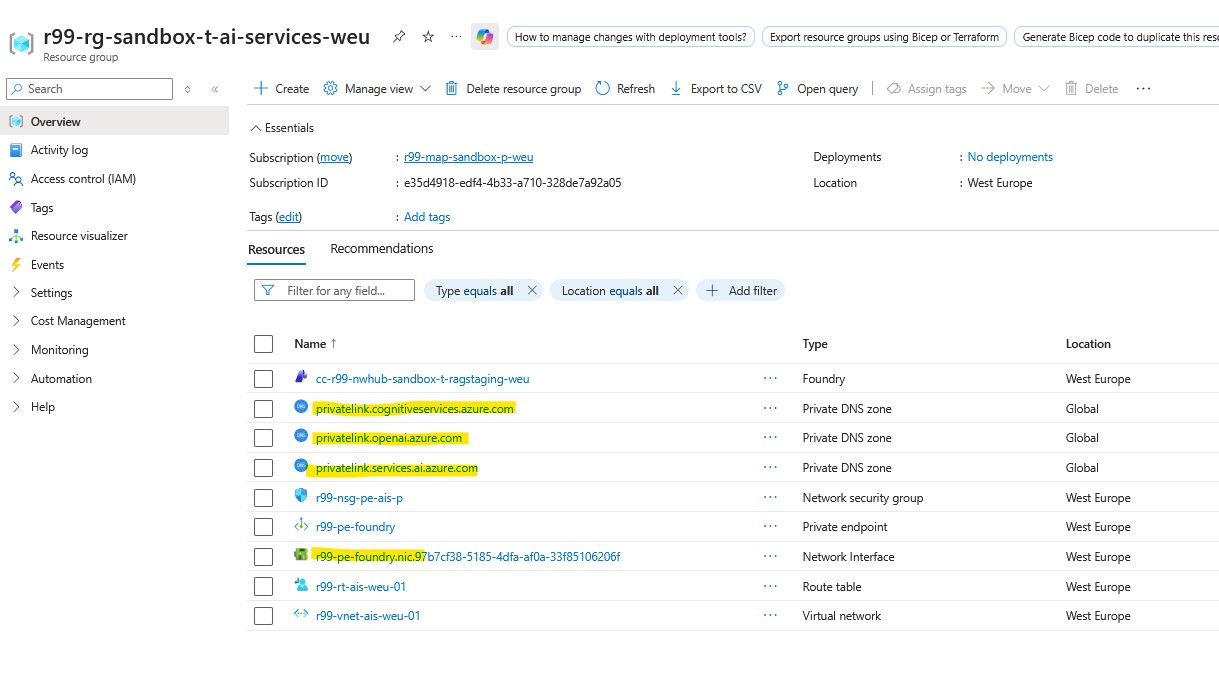
If everything goes well, you must see the following highlighted resources in the resource group.
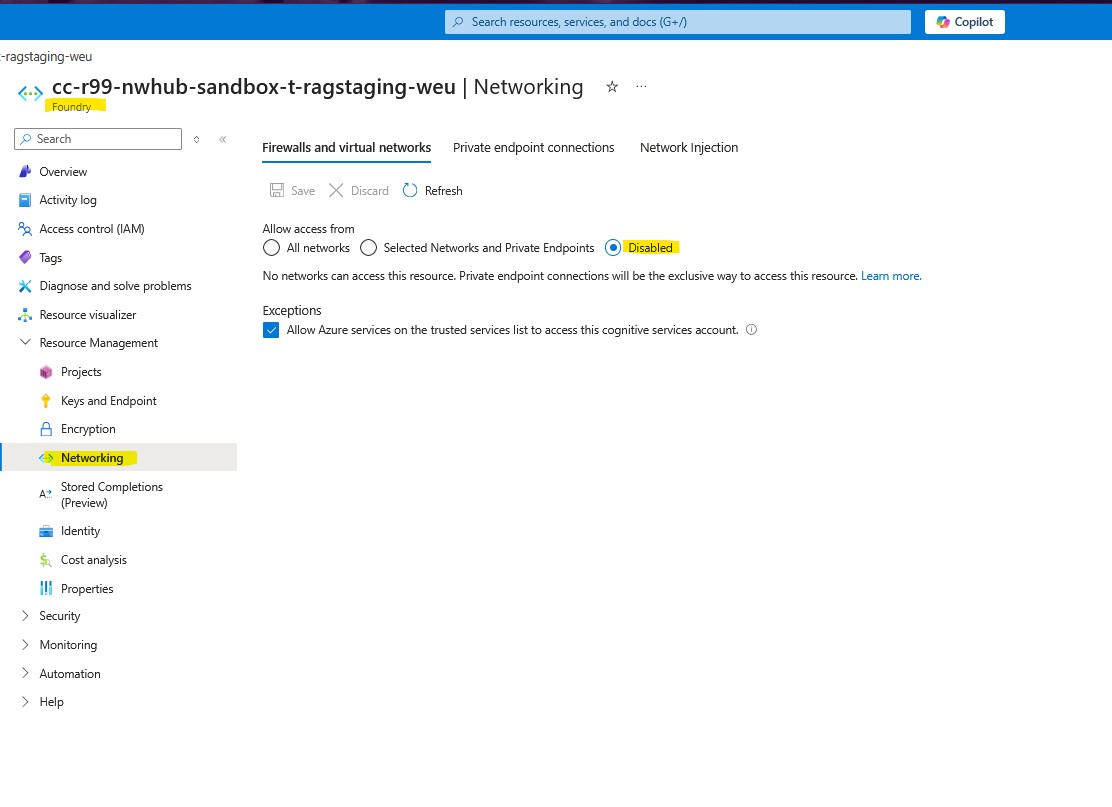
The main reason we use Private Endpoints is to keep workload traffic confined to our tenant VNets, enforce granular traffic control, and protect PaaS resources from unintended exposure to the public internet. For that reason, we disable public access to the service, ensuring it can be reached only via its private IP. This allows us to govern inbound and outbound flows through the NVA in the hub VNet for inspection, policy enforcement, and logging.
Link Private DNS Zones to VNets
Next step is to configure each generated Private DNS zone independently and make sure it’s assigned to the right virtual networks.
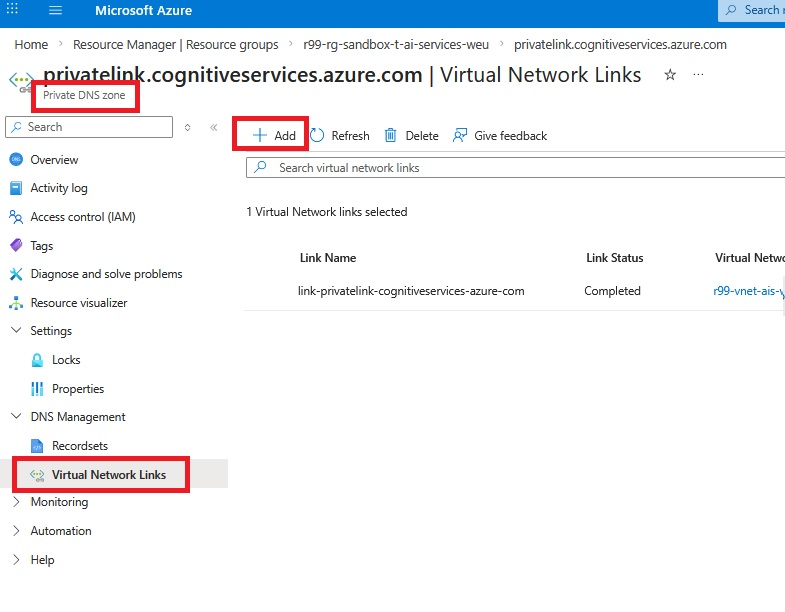
As you can see above, Azure automatically creates a virtual network link between the Private DNS zone and the AI services VNet where the Private Endpoint is deployed, but it does not create links to other VNets. Any VNet that needs to resolve AI Foundry FQDNs to private IPs must be linked to the corresponding Private DNS zones, most importantly the application VNet where the container workloads run. If your spokes use a Hub DNS Private Resolver (inbound endpoint) for name resolution, you should also link the zones to the Hub VNet so the resolver can answer those private-zone queries; otherwise, linking only the consuming spoke VNets is sufficient.
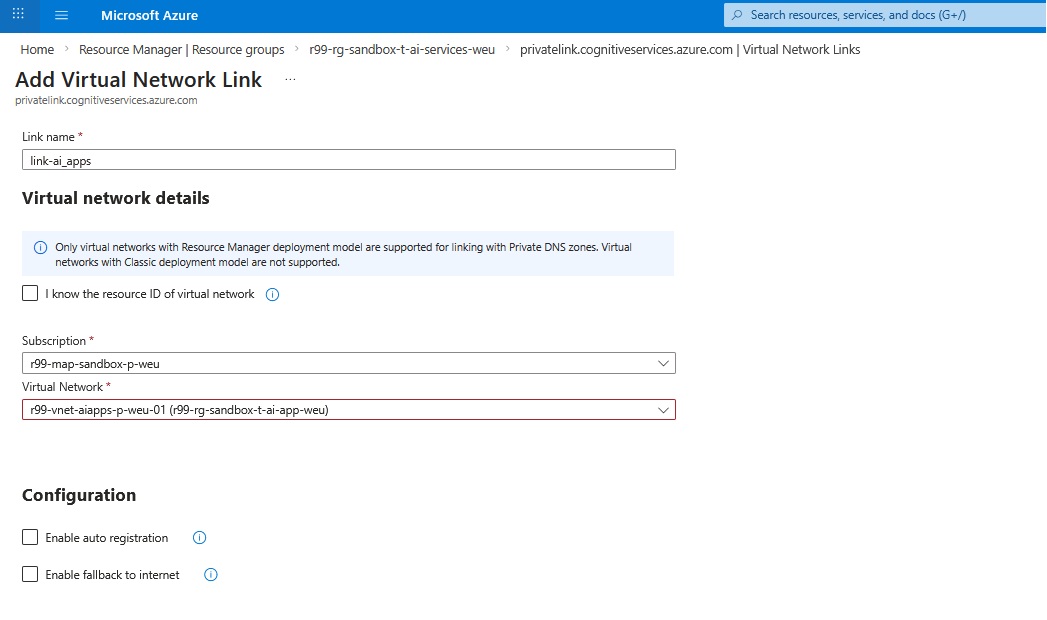
When linking the apps VNet to a Private DNS zone for Private Endpoints, we typically leave Auto registration and Fallback to internet unchecked.
- Auto registration is meant for registering VM hostnames in the zone and would unnecessarily pollute a privatelink.* zone; Private Endpoint records are created by the Private Endpoint/DNS zone integration anyway.
- Fallback to internet is also left disabled to avoid a “fail-open” behavior where name resolution could silently fall back to public endpoints, which would bypass the intended private connectivity model.
We need to do the same steps for two other VNets. In order to verify what we’ve done properly, we can check the IP address configuration under the interface associated with the private endpoint.
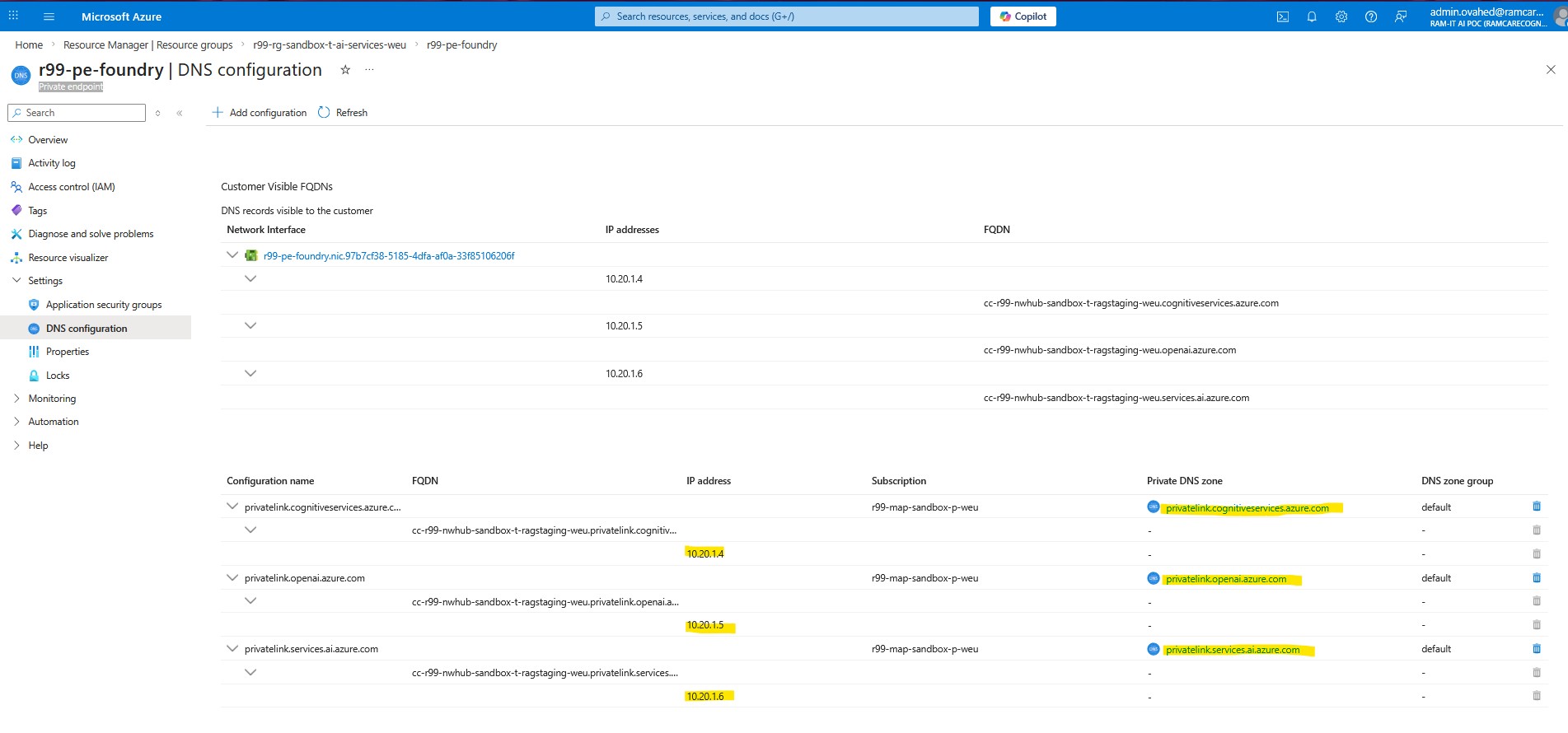
Here we can see three IP addresses dynamically assigned within the Private DNS zones. To understand what each IP address represents, we need to look at the DNS configuration on the newly created Private Endpoint:
Validate Private DNS & IPs
This illustrates a better understanding of how the virtual links give an IPv4 identity to each private DNS zone. You see an independent IP address per Private DNS zone because each zone represents a different FQDN suffix for a special service, and Azure maps each namespace to a separate private-link target behind the scenes.
When you create the Private Endpoint for AI Foundry, Azure actually provisions multiple private-link interfaces (logically) for the different endpoint families:
- cognitiveservices.azure.com
- openai.azure.com
- services.ai.azure.com
Each of those endpoint families gets its own A record in its corresponding Private DNS zone, and each A record points to a distinct private IP on the Private Endpoint NIC.
This separation keeps resolution deterministic: clients querying “*.openai.azure.com” always land on the correct private-link path, while “*.cognitiveservices.azure.com” and “*.services.ai.azure.com” resolve to their own dedicated private IPs, so traffic is routed to the right backend service even though everything is reached through a single Private Endpoint resource.
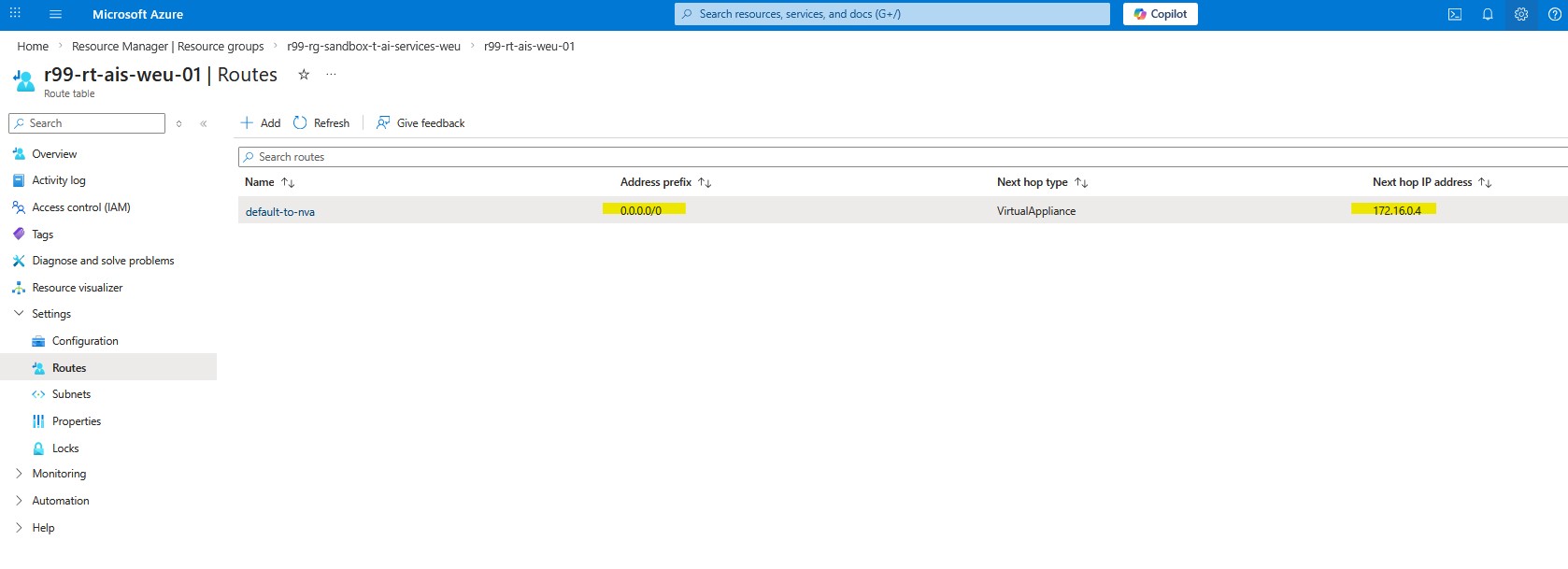
The last step in the AI-Services resource group is to ensure outbound internet traffic is force-routed through the NVA in the Hub VNet using a route table with a 0.0.0.0/0 default route. This controls and inspects egress to public destinations. Private Endpoint traffic, however, is private east–west traffic and typically flows directly over VNet peering to the Private Endpoint’s IP; it won’t be steered to the NVA unless you add more specific UDRs for the Private Endpoint address space/prefixes. If your design requires inspection for Private Endpoint flows, add those explicit routes accordingly.
Application RG: Private Endpoints
Now let’s move on to “Application Resource Group” and take care of the private endpoint configuration there. The application resource group hosts 5 critical services including Storage Account, Container Registries, Key Vault, PostgreSQL, and Container Application Environment. The good news is that we do not need to create a private endpoint for Container Application Environment since we already integrated the CAE with the VNet, and it already received a private IP address on top of an internal load balancer embedded in the Container Application Environment. I already described the process of integrating CAE into a VNet in this blog. However, we must create a private DNS zone and point it to the following IP.
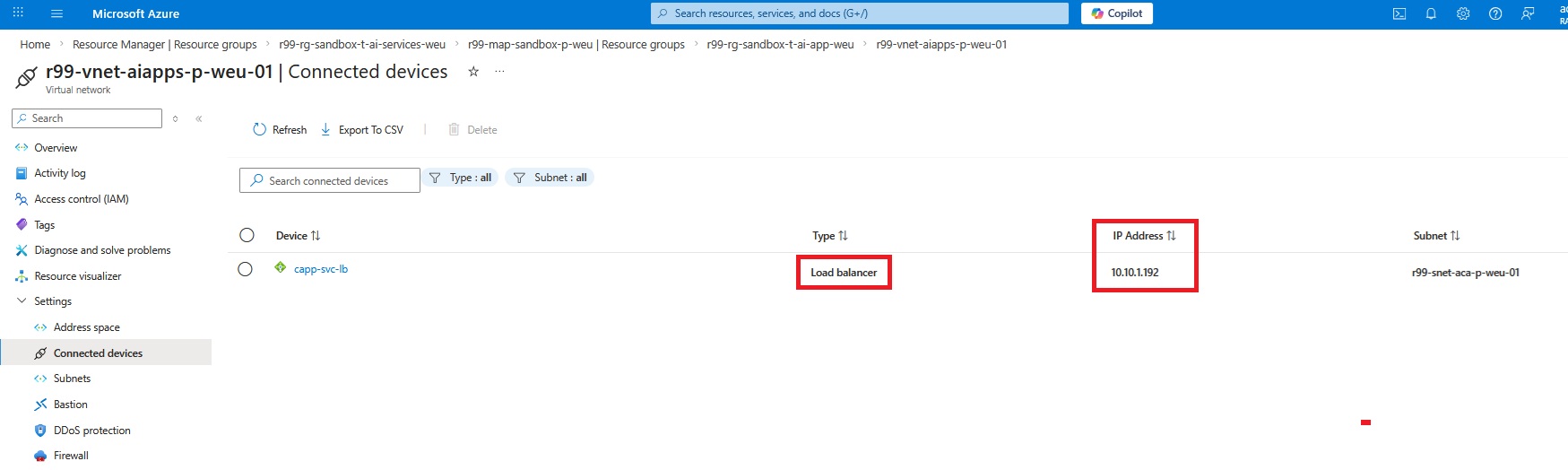
I explained the process of creating the private DNS Zone in my last blog here in detail. Now let’s move on to the Azure PostgreSQL and create the private endpoint.
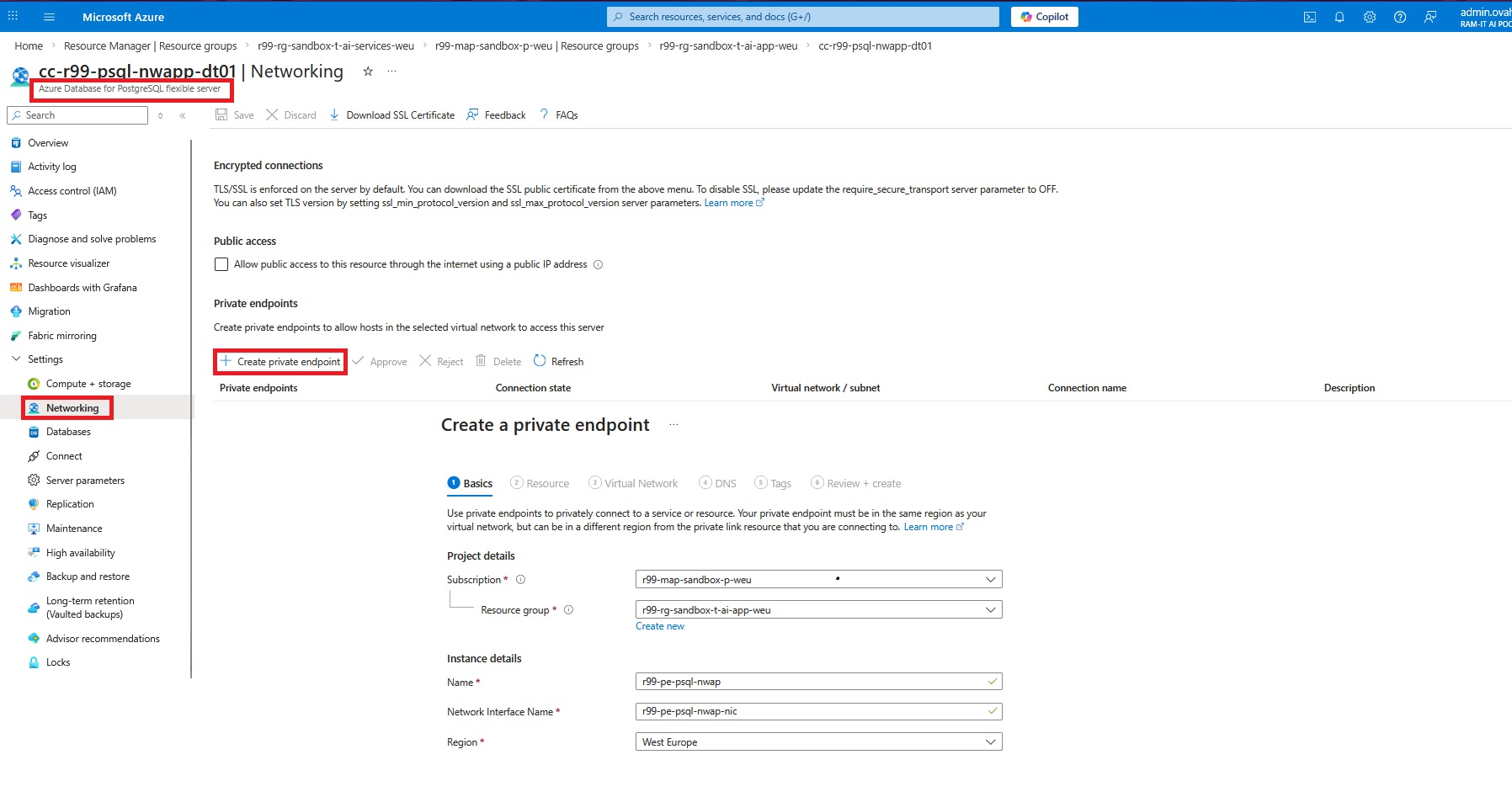
Azure PostgreSQL Private Endpoint
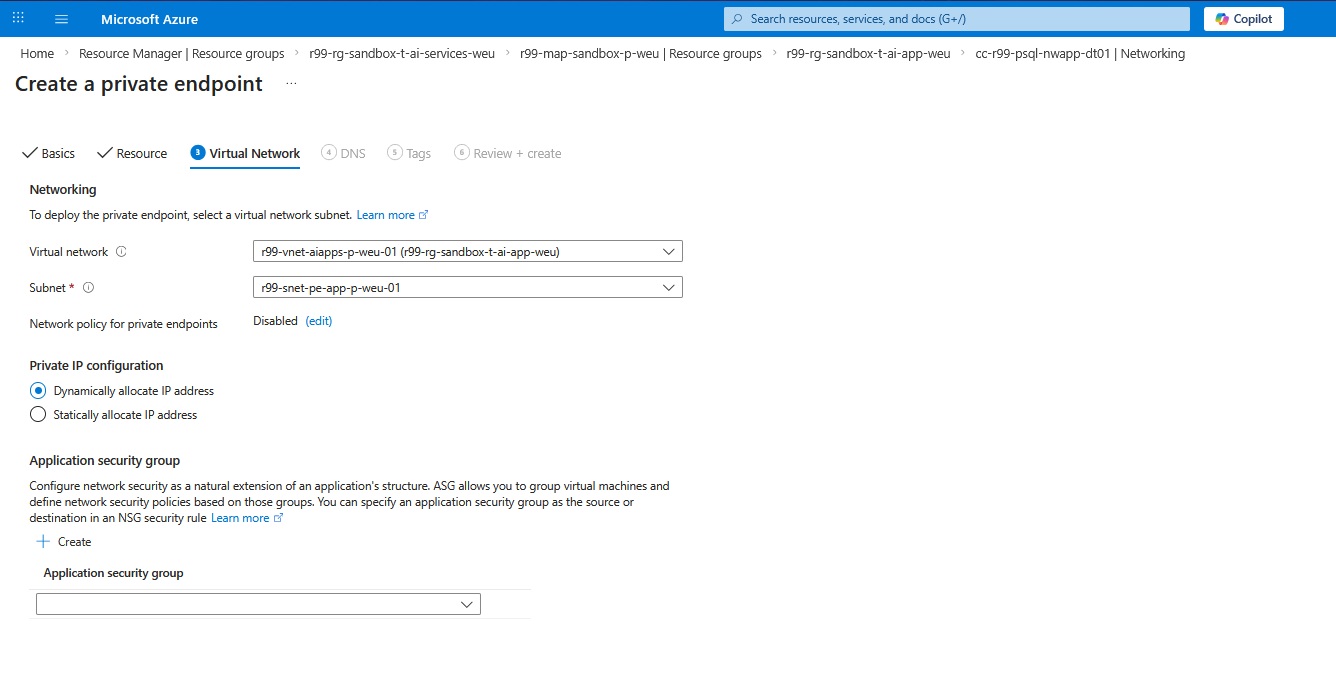
Now we need to link the private endpoint to the right VNet and subnet.
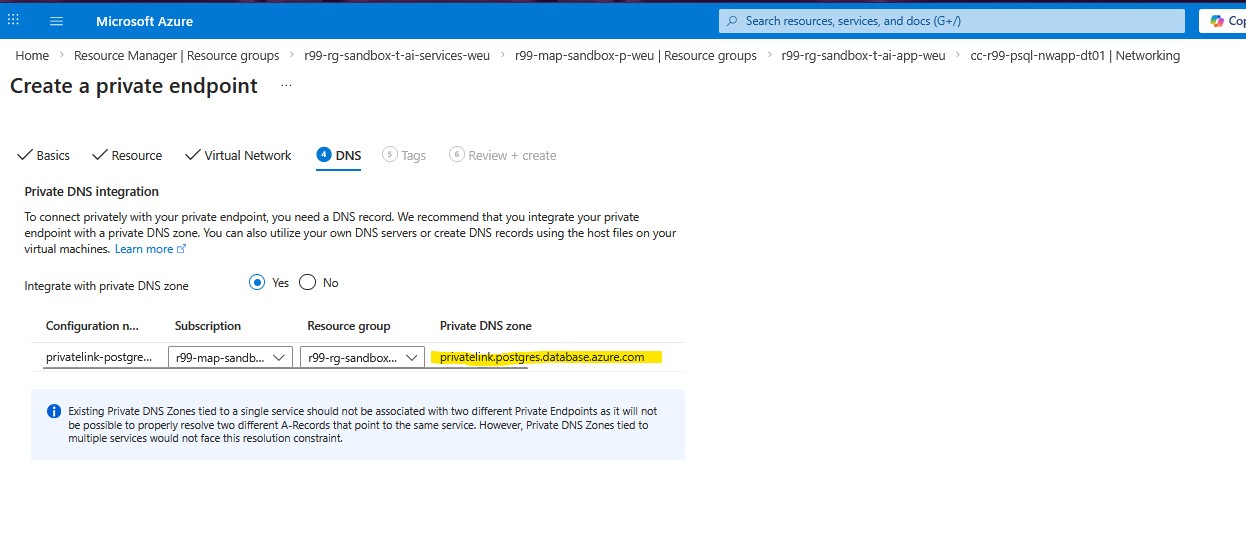
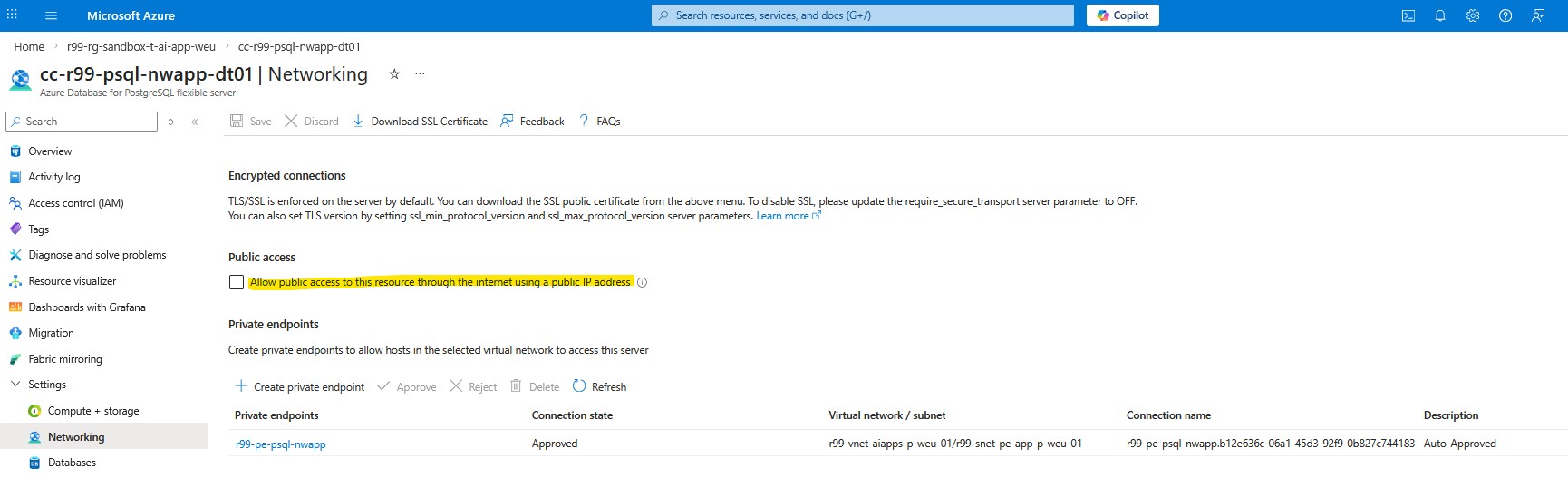
The DNS configuration helps auto-creation of the private DNS zone for this private endpoint. As you can see on the following screenshot, the private DNS zone address “privatelink.postgres.database.azure.com” is assigned by Azure and we’re not able to change it.
We’re almost finished. However, in order to make sure the database will no longer be accessible via the Internet, uncheck the Allow public access checkbox under the networking setting of Azure PostgreSQL.
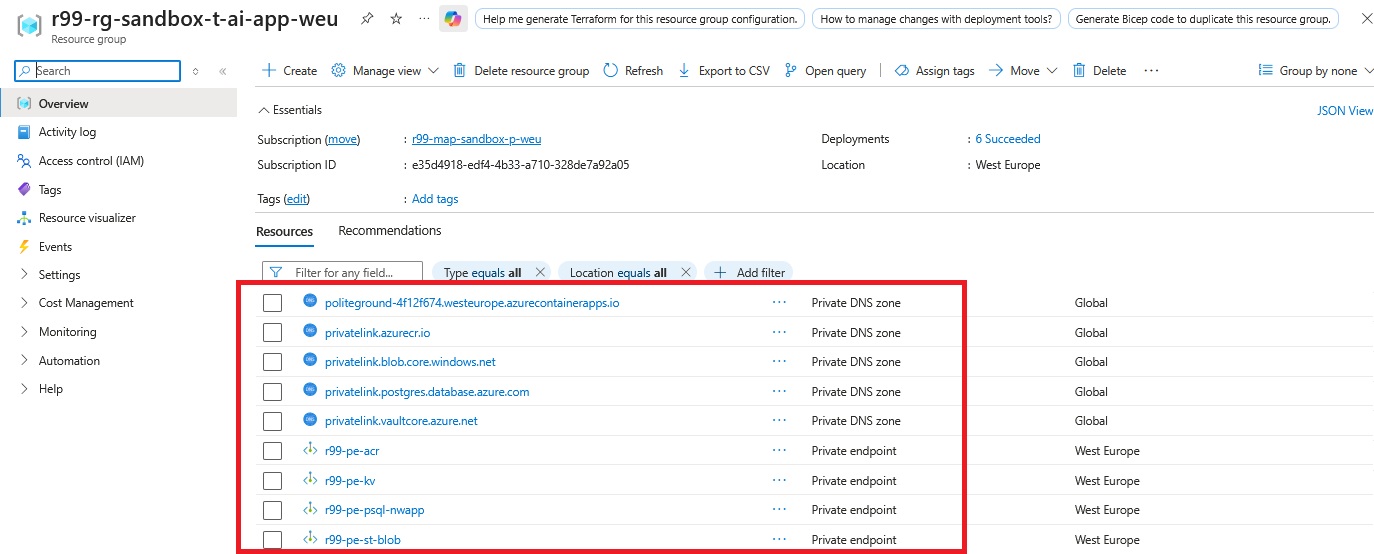
We need to repeat the same steps for the Storage Account, Container Registry, and Key Vault. To confirm everything is configured correctly, you should see the corresponding Private Endpoints and Private DNS zones created under the AI Application resource group:
NVA Security Policy Rule
The last step is to create a new security policy rule on the NVA in the Hub VNet. The traffic flow is initiated from the CAE subnet and it goes to the AI Foundry private-endpoint IP address.
Now let’s connect to the front-end of the Chatbot developed by Ram-it, and shared via the application gateway explained in the previous blog post, and then check the traffic flow logs.
Traffic Flow Logs

Summary
In this article, we secured the AI services layer of our hub-and-spoke architecture by integrating Azure AI Foundry with Azure Private Link. We created a Private Endpoint for the AI Foundry resource in the service spoke, disabled public access to ensure the service is reachable only through its private IPs, and configured the required three Private DNS zones so the different AI service namespaces resolve privately and consistently.
We then extended name resolution across the platform by linking the Private DNS zones to the VNets that consume the service (and, when applicable, the hub DNS Private Resolver), ensuring workloads in the apps spoke can resolve AI Foundry FQDNs to private addresses. Finally, we applied routing and security controls to keep traffic within the tenant network boundary and validate that requests from the application workloads reach the AI Foundry Private Endpoint as intended—without relying on public endpoints.